Hexagon Three Tier Tray SVG-DXF Patterns: A Practical Guide to Precision Assembly
The geometric elegance of a hexagonal structure offers more than just visual appeal; it provides inherent stability and efficient use of material when executed correctly. Hexagon Three Tier Tray SVG-DXF Patterns have become a staple for makers looking to create functional organization units, retail displays, or unique home decor. The popularity of this specific design stems from its modularity and the satisfying interlocking nature of honeycomb geometry. However, the transition from a digital vector file to a physical, sturdy three-tier object is where many projects falter. Understanding the nuances of these files ensures that your time at the laser cutter or cutting plotter results in a professional-grade product rather than a pile of ill-fitting parts.
Understanding File Compatibility Beyond the Glowforge
While these patterns are frequently marketed as being designed for Glowforge Pro machines, limiting your perspective to a single ecosystem can hinder your workflow. The included DXF, SVG, PDF, AI, and CDR formats represent a universal language for fabrication. A common oversight occurs when users assume that an SVG optimized for a Glowforge will automatically perform perfectly on a Cricut Maker, Silhouette Cameo 4, or Sizzix die-cutting machine without adjustment.
Laser cutters and blade plotters interpret vector paths differently. Laser software typically reads lines as cut paths based on stroke color and width, whereas paper craft machines like the Brother ScanNCut or Gemini often rely on fill colors or specific layer attributes to distinguish between cuts, scores, and perforations. Before sending Hexagon Three Tier Tray SVG-DXF Patterns to your machine, open the file in native editing software like Adobe Illustrator, CorelDRAW, or even free alternatives like Inkscape. Verify that all paths are closed and that there are no overlapping vectors. Overlapping lines can cause a laser to pass over the same edge twice, leading to charred edges and dimensional inaccuracies that prevent tight friction fits. For blade users, ensure the file includes separate layers for scoring fold lines versus through-cuts, as the machine cannot infer folding intent from a standard laser-ready file.
Material Thickness and Kerf Compensation
The most frequent cause of assembly failure with tiered trays is ignoring material variance. These digital patterns are mathematically precise, but physical materials are not. A sheet labeled "3mm plywood" may actually measure 2.8mm or 3.2mm depending on humidity, manufacturer tolerances, and sanding. When constructing a hexagon tray that relies on slot-and-tab joinery, a 0.2mm discrepancy can result in joints that are either too loose to hold weight or so tight they crack during assembly.
Rather than assuming the downloaded pattern is perfect for your stock, adopt a testing-first approach. Cut a single hexagonal ring and one vertical support tab from your intended material before committing to the full three-tier project. Measure the actual thickness of your material with digital calipers, not a ruler. If you are using a laser cutter, account for kerf—the width of material removed by the beam. Many high-quality Hexagon Three Tier Tray SVG-DXF Patterns include kerf-adjusted versions, but if yours does not, you may need to apply a small offset in your design software. For paper craft machines using cardstock or chipboard, the blade depth and pressure settings must be calibrated specifically for the substrate density. A blade that drags will tear the internal corners of the hexagons, compromising the structural integrity of the tier connections.
Evaluating Structural Integrity and Design Logic
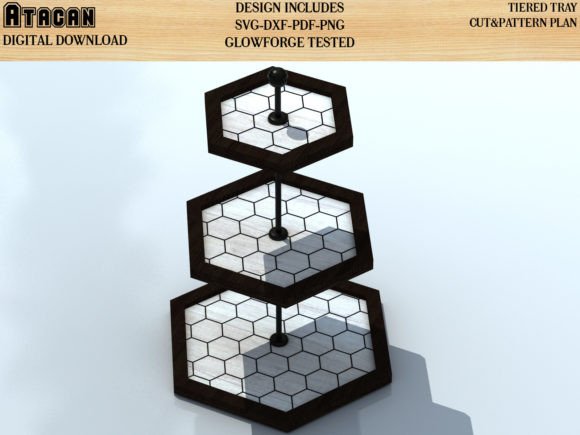
Not all hexagonal tray designs are created equal. When selecting or evaluating a pattern, look beyond the aesthetic rendering and examine the engineering of the joints. A visually stunning 3D render does not guarantee a stable physical object. Poorly designed patterns often feature tabs that are too short for the material thickness or lack adequate glue surface area. In a three-tier configuration, the bottom tier bears significant load; if the connection points are merely decorative slots without mechanical locking features or sufficient adhesive contact, the unit will wobble or collapse under use.
Inspect the vector preview for dog-bone fillets at internal corners. Lasers cannot cut sharp internal right angles due to the roundness of the beam path. Without relief cuts or fillets built into the SVG-DXF pattern, mating parts will never sit flush against each other. This gap forces you to use excessive filler or sand down tabs, both of which degrade the final presentation. Additionally, verify that the pattern accounts for grain direction if using wood. Hexagonal symmetry means some panels will inevitably have cross-grain orientation. High-quality patterns will indicate grain direction or split larger panels to minimize warping risks. Ignoring this detail can lead to a tray that twists over time as environmental conditions change.
Optimizing Workflow for Efficiency and Cost
Makers and small business owners often underestimate the impact of nesting efficiency on profitability. Hexagons are inherently space-efficient shapes, but only if the digital pattern is nested correctly. A common mistake is cutting each tier as a separate job or leaving excessive spacing between parts due to fear of fire risk or blade drag. This wastes valuable material and increases machine runtime.
Utilize the DXF or AI files to re-nest components based on your specific bed size and material dimensions. Group parts by thickness and cut priority. For laser users, arrange pieces so that shared edges can be utilized where safe, reducing total travel distance. For Cricut or Silhouette users, maximize mat usage by rotating hexagonal elements to fit within the usable cutting area. Remember that the JPG files included in your download are for reference only; never attempt to auto-trace a JPG for production. Traced raster images introduce jagged edges and node bloat that frustrate precision machinery. Always work directly with the provided vector sources to maintain crisp geometry and predictable machine behavior.
Assembly Preparation and Finishing Considerations
The success of Hexagon Three Tier Tray SVG-DXF Patterns depends heavily on preparation before the first piece of glue is applied. Dry fitting is non-negotiable. Assemble the entire structure without adhesive to identify tight spots, misaligned tiers, or warped panels. This step reveals issues that are irreversible once glue sets. Keep a small file or sandpaper handy to ease tabs that are slightly oversized. It is far better to remove material incrementally than to force a joint and split the surrounding wood or paper.
Consider the finish before assembly. Staining or sealing individual flat components is significantly easier than trying to reach into the internal angles of an assembled hexagonal tower. Masking tape applied before laser cutting protects surfaces from scorch marks and reduces post-processing cleanup time. However, ensure masking is fully removed from joint areas before gluing, as adhesive will not bond to tape residue. For paper craft variations, pre-creasing score lines with a bone folder ensures crisp folds and prevents fiber tearing during assembly. By treating the digital pattern as a starting point rather than a guaranteed outcome, and by respecting the physical properties of your chosen medium, you transform a simple vector file into a reliable, repeatable product suitable for sale or personal use.